
Site visit & scope
Walk the existing premises and the new one. Count workstations, identify IT and fragile items, plan the labelling system.
Professional office removalists for business relocations in Perth, Sydney, Melbourne, Brisbane and Gold Coast, moving workstations, equipment and office contents to a planned schedule, including after-hours moves. Share your workstation count, your IT setup, and your move window, and plan a move that keeps operating downtime to a minimum.
Small offices, corporate floors, retail fit-outs, crews and timing planned around your trading hours, not against them.

Office removalists run a different playbook to residential moves. A commercial relocation hinges on three things, workstation count, IT equipment handling, and timing. Most office moves we see in Sydney office relocations scheduled after hours happen on a Friday evening, run through the weekend, and finish Sunday so staff arrive Monday morning to a working office. Lift bookings, dock access, building management coordination, all of it is locked before the truck leaves.
Commercial movers plan the move in stages. A pre-move site visit (mandatory above 10 workstations) confirms the floor plan, identifies fragile equipment, plans the loading sequence, and establishes the new-office floor map so workstations land in their assigned spots. Labelled boxes and asset-tagged hardware mean nothing arrives orphaned. The whole framework exists to minimise the one thing every business measures, operating downtime.
Four stages, designed so the business reopens on schedule.
Walk the existing premises and the new one. Count workstations, identify IT and fragile items, plan the labelling system.
Written quote with crew size, truck count, hours, and the move window. After-hours and weekend slots are confirmed.
Workstations broken down, IT equipment wrapped, boxes and assets tagged. Loading order matches the new floor plan.
Workstations rebuilt in their assigned spots, IT staged for the in-house team, signed asset inventory at completion.
Three of the most common moments inside a commercial relocation, equipment, furniture, and the new-office setup.

Monitors, CPUs, servers, and networking gear wrapped individually. Anti-static handling on request. Cable bundles labelled to source workstations.
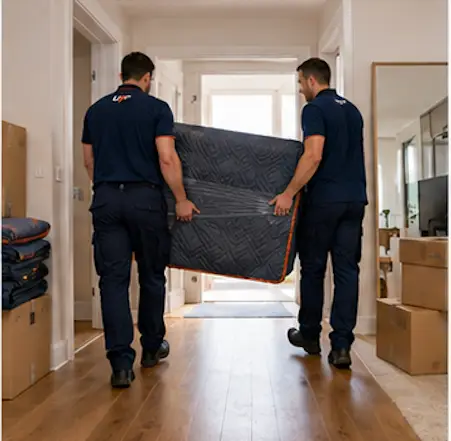
Document boxes, filing cabinets, archive boxes, labelled by department or floor zone so unpacking is a search-free exercise.
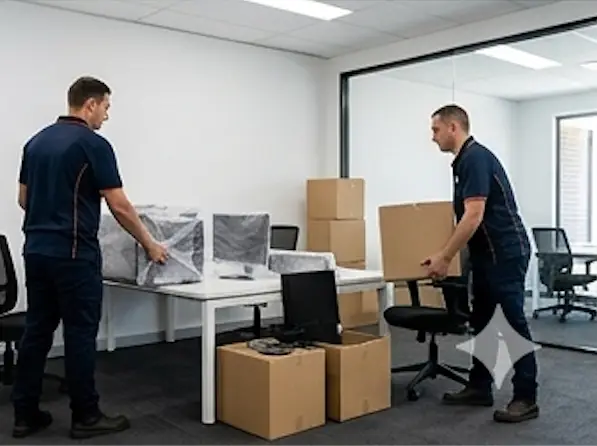
Workstations reassembled in their assigned positions per the new floor plan. IT equipment placed at each desk ready for the in-house tech team.
A typical Melbourne office move for CBD and inner-city premises runs over a Friday-night to Sunday window so trading resumes on Monday. Office removalists handle commercial relocations. For residential moves of houses, apartments, and family homes, see house removalists.
Business move planning is built around the commercial-relocation framework. Default inclusions on every office move, plus the items typically charged as extras.
Note on data: the office removalist warranty covers physical damage to hardware. Data loss, software corruption, and operating-system damage are excluded. IT backups remain the customer’s responsibility before the move begins.
Six factors shape almost every commercial relocation quote.
The single biggest driver. Crew size, truck count, and hours all scale with the number of workstations to disassemble, move, and rebuild.
Monitors, CPUs, servers, networking racks. IT handling adds wrap time, careful loading, and dedicated tracking.
Loading dock vs street entry, lift bookings, security passes, and after-hours building manager attendance.
Friday-evening-to-Sunday is the standard slot. Mid-week moves cost less but cut into trading hours.
Same-building floor swaps move quickly. Cross-CBD or out-of-CBD moves add transit time and traffic windows.
Server racks, safes, large copiers, lab equipment, and bespoke fit-out items need specialist gear and add documented line items.
For variation handling, deposit rules, and the no-surprise pricing framework, see our pricing and variations policy.
Five city-specific office removalist pages. Pick yours.

Every office relocation is performed by an independent contractor crew running their own commercial removalist business. Urgent Pro acts as the booking agent, checking credentials, holding the customer payment, and standing behind the warranty, while the crew handling your workstations and IT is the team matched to your move scope and timing window. Commercial movers go through the same verification before activation.
For the full booking process from request to delivery, see how Urgent Pro works.
Every commercial booking is backed by a written service warranty, the Australian Consumer Law, and a documented damage claim process.
48-hour visible-damage inspection window plus 7-day final written-claim window for damage found during the new-office set-up.
Read the Removalists Service WarrantyYour rights under the Australian Consumer Law for major and minor failures, refund, re-performance, and compensation explained in plain English.
Read the Consumer Guarantee SummaryDocumented damage scenarios with resolution paths and the $10M public liability cover that sits behind every office move. Data loss is excluded.
Read the Removalists Damage ClaimsOffice move costs depend on workstation count, IT equipment volume, building access, move timing, and distance. A 10-workstation office over a weekend typically runs a three- to four-person crew across two days. A 50-workstation corporate floor needs multiple crews and trucks, planned around lift bookings and dock access. Every quote is written and itemised; the pre-move site visit is the most important step.
Yes, and most office moves do. The standard window is Friday evening through Sunday so staff arrive Monday to a working office. Public holiday long weekends are popular for larger relocations. After-hours timing carries a premium for crew rates and building access surcharges, but the trading-hour cost saving usually outweighs it. The site visit confirms what your building permits.
Workstations are disassembled at the source, components are labelled by workstation ID, and the parts travel together. IT equipment (monitors, CPUs, peripherals) is wrapped individually with cable bundles tagged. At the new premises, workstations are rebuilt at their assigned positions per the floor plan, and IT is staged at each desk ready for your in-house tech team to power up and test.
Yes. Standard office furniture, workstations, partitions, modular desks, filing cabinets, bookshelves, is disassembled at the source and reassembled at the new premises by default. Bespoke fit-out items, custom millwork, and specialist equipment (server racks, safes, large copiers) are documented as line items in the quote with their own handling protocols.
A small office (under 10 workstations) can usually move in a single day with a three-person crew and one truck. A corporate relocation (50+ workstations or multi-floor) needs a pre-move site visit, multiple crews working in parallel, lift booking coordination, and often a phased move across two weekends. The booking framework is the same. The planning depth and crew count scale.
From first contact to move completion, plan 2–4 weeks for a small office and 6–12 weeks for a corporate relocation. The site visit happens early, the quote is locked, IT and facilities teams coordinate the labelling system, and the move itself usually runs over a single weekend. Larger moves are phased, group A on the first weekend, group B on the second.
Weekend or after-hours timing is the primary mechanism. Floor-plan-driven labelling means staff walk into a desk that already matches their old one. Phased moves let one team keep trading while another moves. IT staging at the new premises means your in-house tech team plugs in rather than installs. The combination usually delivers a Monday morning that looks identical to the Friday before.
Every crew carries minimum $10M public liability and goods-in-transit cover. The Removalists Service Warranty covers physical damage to furniture, workstations, and hardware caused by negligent handling, with a 48-hour visible-damage window plus a 7-day hidden-damage window after the move. Data loss, software corruption, and operating-system damage are excluded. IT backups remain the customer’s responsibility before the move begins.
Share your workstation count, IT setup, and preferred move window. A local commercial crew will arrange a site visit, return a written quote, and lock the move into a window that protects your trading hours.